
Announcing the New Dental Design Viewer & Patient Sharing Experience
We’re excited to announce a major refactor and redesign of the Dental Design Viewer for all CAE Dental customers! This update brings a modern, streamlined experience for both dental professionals and their patients, making it easier than ever to review, approve, and share digital dental designs.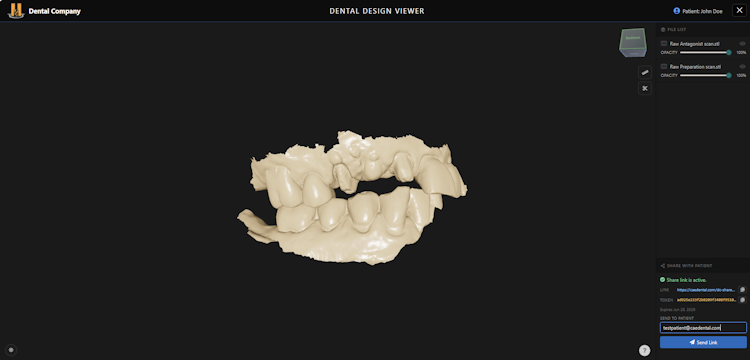
What’s New?
1. Refactored Dental Design Viewer
- Modern Interface: The viewer has been completely rebuilt for clarity and ease of use, with a clean, clinical look inspired by industry leaders.
- Model Controls: Easily adjust model visibility and opacity, orbit around any model, and enjoy smooth, responsive controls on any device.
- Smart Orbit: When you select a model, the viewer orbits around it for precise inspection. Deselect to orbit the entire case.
- Measure Tool: Accurately calculate distances, lengths, and clearances between objects in 3D model space.
- 2D Cross Section Tool: Slice through your models to reveal precise internal details, with real-time updates as you drag the cut plane.
2. Patient Viewer & Secure Sharing
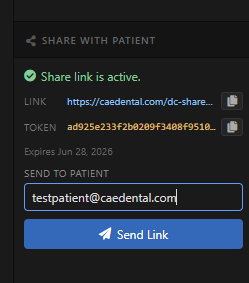
One-Click Sharing:- Dentists and Technicians can now generate a secure Patient Viewer link for any case. Simply click “Share with Patient” to create a unique, private link.
- No Login Needed: Patients access their case with a single click and required token—no account required.
How the Patient Viewer Works
- Open a Case: In your Cases page, open any order or case.
- Press Open Design Viewer: Button is located under each order item in the order.
- Click “Share with Patient”: Find the share button in the case actions. This generates a secure link and token.
- Send the Link: Either enter your patients email and click Send or Copy the link and token and send to your patient via email, text, or your preferred method.
- Patient Experience:
- The patient opens the link and sees a simple, interactive 3D view of their dental design.
- Your Company name and Logo(If you have added it in your profile page) are displayed to help patients identify your clinic.
- They can rotate, zoom, and inspect the model just like you can.
- Patients can approve the design or request changes directly from the viewer—no extra steps!
Why This Matters
- Faster Approvals: Patients can review and approve designs instantly, reducing turnaround time.
- Better Communication: The visual, interactive experience helps patients understand their treatment and provide feedback.
- Security: Every share link is unique and private—only those you send it to can access the case.
Try It Today!
This upgrade is live for all CAE Dental customers. Log in to your dashboard, open a case, and try sharing with a patient. We’re confident this new workflow will make your digital dentistry experience smoother and more collaborative than ever.If you have questions or feedback, our support team is here to help.— The CAE Dental TeamShare this post
Related
Posts
Latest News
Design Settings: Save Your Product Preferences Once, Order Faster Every Time
What Is Design Settings?Design Settings is a new feature in your My Account area that lets you save your preferred...
Latest News
New Card Management Features: Safer, Smarter, and More Flexible
We’ve updated our payment system to give you more control and security when managing your saved credit cards on your...
Latest News
New Improvements to the Dental CAD Design Viewer
New Update for Dental Design Viewer: See Your Cases Come to Life, Right from Your Orders PageWe're excited to announce...
Latest News
Introducing Quick View — See Your Order Details Instantly
🚀 New Feature Release: Quick View for Orders We’re excited to introduce a powerful new upgrade to your customer account —...